

Happy Friday the 13th! Not a day I fret about for me… it has been more a good day in my family than something to worry about… Today I am showing a photo that asked to be taken and what I have done with it in Photoshop Elements.
I woke early one morning this week with an achy body that wasn’t happy, and when walking to the kitchen for pain pills, I looked out the front door and this is what I saw….
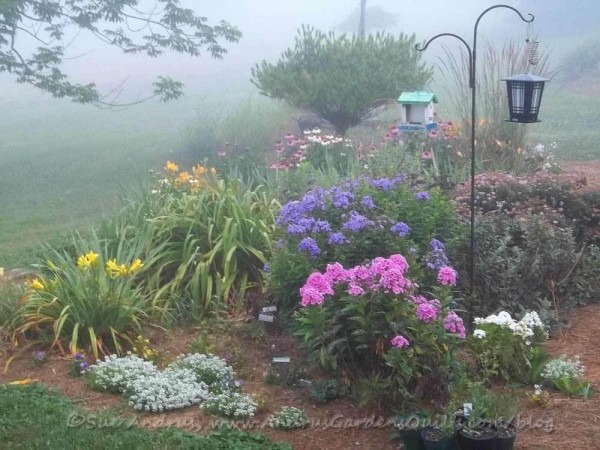
- Front Door Garden in the Fog
The fog was pretty thick and the Phlox in the garden seemed to glow, so I grabbed the camera and took a few photos. The fog gives a mysterious look to things as it hides the expanse of lawn beyond the garden. I then decided to see what would happen if I played a bit with it in Photoshop and what I ended up with is next…
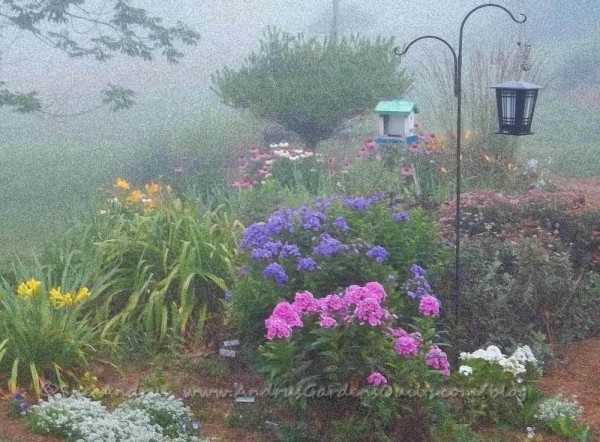
Foggy Morning
I did a bit of cropping and tweaking of the color saturation to bring out the glow in the Phlox. Then to see what would happen, I played with some effects and liked what I got with the Artistic- Sponge (at whatever the settings were that it defaulted to). I liked how it added some graininess to the photo and intensified the mystery of the fog. I added the effect to a duplicate layer, so I could then lightly erase some of the graininess from the Phlox, bird houses and a few more flowers to get the brighter colors from the original layer to make them pop a bit more. I have tons more to learn while playing with my photos in Photoshop Elements, but at least the playing I am doing is something that is getting me doing something creative more often now. Maybe a few little quilts will be inspired by my playing with the photos…


I am a former textile artist and new pattern designer with a degree in horticulture, wishing to share my love of nature, flowers and gardens with everyone through my photos, sunprinted fabrics, and now pattern designs. Chronic Lyme Disease has caused major changes to the direction my life. I have to limit the amount of time spent digging in my gardens, and quilting has become more difficult. I discovered pattern design as a way to get art back into my life. I now use my gardens and photos to inspire designs that can be used on fabrics and print on demand items.





Oh how beautiful. The fog is such a wonderful contribution to the composition. I’d love to stroll through it. Thanks so much for sharing this with Flower Art Friday!
This is really lovely, well done.